Wednesday, September 23, 2009
Nokia N900 - Maemo Video Overview
Maemo is a computer architecture platform built using open source Linux components. Maemo is one of Nokia’s core handset platforms characterized by high performance, new cool UI principles and Internet philosophy.
To know more about The Maemo platform.
Thursday, September 10, 2009
Linux From Scratch
Linux From Scratch (LFS) is a project that provides you with step-by-step instructions for building your own custom Linux system, entirely from source code.
It's a very good for whom want to understand Linux in more.
LFS also provide a LFS LiveCD
A LFS LiveCD is a CD that is able to boot your system into a 'live', working operating system, independent of anything on your hard drive. It's a little different than an installation CD, which boots your system into a program that will guide you through the installation of some system onto your hard drive. With a LiveCD, you have an entire system contained on the CD and with that, the freedom to do nearly anything that a system installed on your hard drive can.
The LFS LiveCD is geared specifically toward providing a reliable host system for the purpose of building Linux From Scratch. Therefore, it may not be what you would envision as a "perfect" Linux system. It should, however, provide you with a comfortable enough environment so that you can, in turn, build your own "perfect" system.
It's a very good for whom want to understand Linux in more.
LFS also provide a LFS LiveCD
A LFS LiveCD is a CD that is able to boot your system into a 'live', working operating system, independent of anything on your hard drive. It's a little different than an installation CD, which boots your system into a program that will guide you through the installation of some system onto your hard drive. With a LiveCD, you have an entire system contained on the CD and with that, the freedom to do nearly anything that a system installed on your hard drive can.
The LFS LiveCD is geared specifically toward providing a reliable host system for the purpose of building Linux From Scratch. Therefore, it may not be what you would envision as a "perfect" Linux system. It should, however, provide you with a comfortable enough environment so that you can, in turn, build your own "perfect" system.
Tuesday, August 11, 2009
Installing Firefox 3.5 on Ubuntu

Firefox 3.5 is available.
The Check For Updates link in Firefox is disabled in Ubuntu. Firefox should only be updated through the package-management system.
or install it directly:
install the following package: firefox-3.5. Firefox 3.5 will be installed alongside Firefox 3.0.
When you have installed the new package, a new icon will appear in Applications > Internet alongside your old Firefox icon. The name is based on the codename for the new Firefox release, so Firefox 3.5 was labelled Shiretoko Web Browser.
more details: https://help.ubuntu.com/community/FirefoxNewVersion

Friday, July 31, 2009
How to install KDE on ubuntu
The default desktop of Ubuntu is Gnome.If you want KDE, you can install Kubuntu.
Alternatively, you can install Kubuntu on Ubuntu using Synaptic Package Manager.
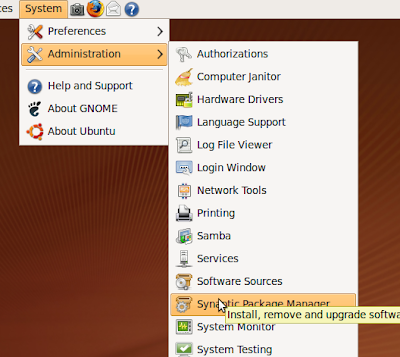
Click System > Administration > Synaptic Package Manager on Ubuntu menu.
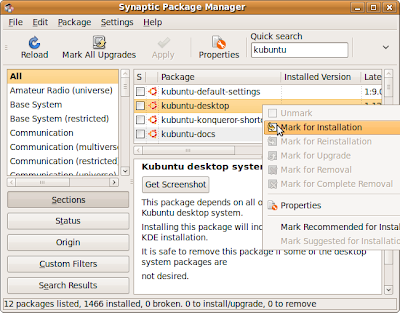
Type Kubuntu inside the Quick search box, mark Kubuntu to install.
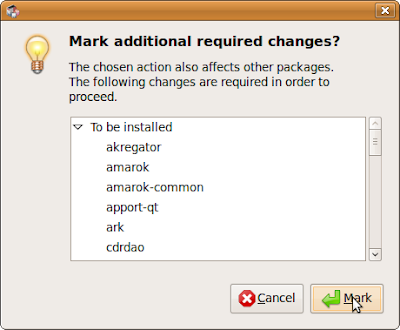
You will be asked to mark additional required changes, just mark it.
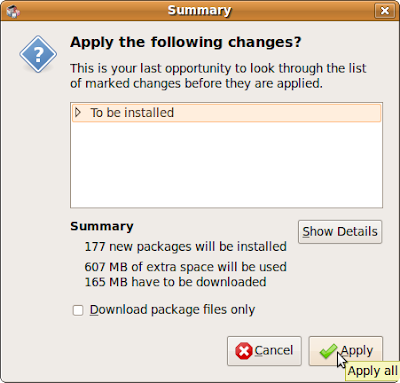
And click Apply.
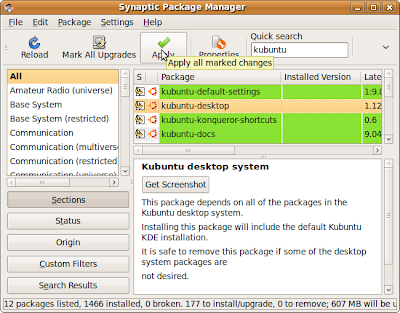
Click Apply again to confirm changes.
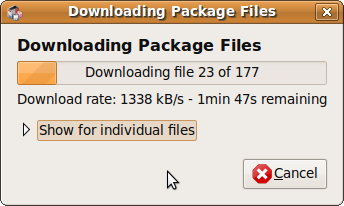
Wait the package to be downloaded.
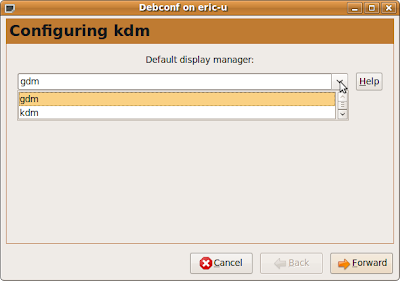
You will be asked to select the default display manager, gdm? or kdm? It's the display manager of the login screen , any one is ok.
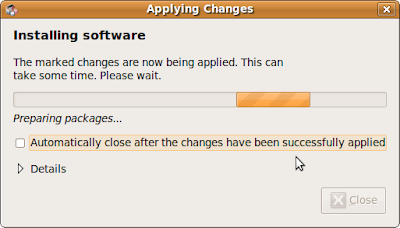
Wait install and changes applied.
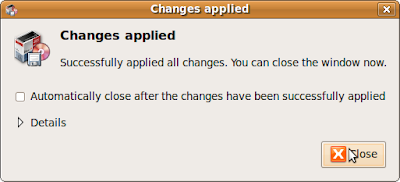
Now, you can restart or log-out and log-in again to switch to KDE.
You can Select KDE Session by clicking Options on the lower-left of login screen.
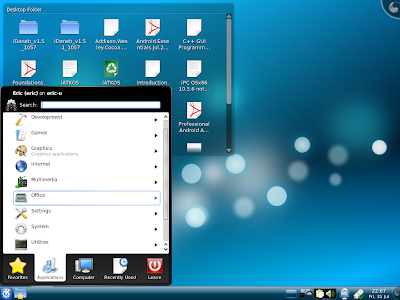
Now, your system have both Gnome and KDE installed, you can switch between in login screen.
Alternatively, you can install Kubuntu on Ubuntu using Synaptic Package Manager.
Click System > Administration > Synaptic Package Manager on Ubuntu menu.

Type Kubuntu inside the Quick search box, mark Kubuntu to install.

You will be asked to mark additional required changes, just mark it.

And click Apply.

Click Apply again to confirm changes.

Wait the package to be downloaded.

You will be asked to select the default display manager, gdm? or kdm? It's the display manager of the login screen , any one is ok.

Wait install and changes applied.


Now, you can restart or log-out and log-in again to switch to KDE.
You can Select KDE Session by clicking Options on the lower-left of login screen.

Now, your system have both Gnome and KDE installed, you can switch between in login screen.
Thursday, July 23, 2009
How to setup cvs server on Ubuntu
Install cvs and cvsd, start Synaptic Package Manager from ubuntu menu bar
System > Administration > Synaptic Package Manager
typ cvs in Quick Search box, select cvs and cvsd, click Apply.
When installing cvsd, you will be asked to enter Repositories to serve, the default setting is /demo:/myrepos, just accept it and click Forward.
After changes applied, you can close Synaptic Package Manager.
Next, open a Terminal.
Type the command to create /myrepos
#cd /var/lib/cvsd
#sudo mkdir myrepos
Initial /myrepos
#sudo cvs -d /var/lib/cvsd/myrepos init
Modify the file /var/lib/cvsd/myrepos/CVSROOT/config
(May be you have to change the permission to writable)
#sudo gedit /var/lib/cvsd/myrepos/CVSROOT/config
Add the line into it:
SystemAuth=no
PamAuth=no
LockDir=/tmp/myrepos
Save and Exit editor
Create LockDir
#sudo mkdir /var/lib/cvsd/tmp/myrepos
Add a user, named cvsuser
#sudo cvsd-passwd /var/lib/cvsd/myrepos cvsuser
You will be ask to input password.
Modify /etc/cvsd/cvsd.conf
#sudo gedit /etc/cvsd/cvsd.conf
Scroll to end of the file, find the text
Listen * 2401
Repos /demo
Repos /myrepos
change to
Listen 127.0.0.1 2401
Repos /demo
Repos /myrepos
where 127.0.0.1 is my local static IP, 2401 is the default port used by cvs.
and then, set the right.
#sudo chown cvsd:cvsd /var/lib/cvsd -R
Restart cvsd
#sudo /etc/init.d/cvsd restart
You can check the cvsd status using the command, and make sure it's running.
#sudo /etc/init.d/cvsd status
System > Administration > Synaptic Package Manager
typ cvs in Quick Search box, select cvs and cvsd, click Apply.
When installing cvsd, you will be asked to enter Repositories to serve, the default setting is /demo:/myrepos, just accept it and click Forward.
After changes applied, you can close Synaptic Package Manager.
Next, open a Terminal.
Type the command to create /myrepos
#cd /var/lib/cvsd
#sudo mkdir myrepos
Initial /myrepos
#sudo cvs -d /var/lib/cvsd/myrepos init
Modify the file /var/lib/cvsd/myrepos/CVSROOT/config
(May be you have to change the permission to writable)
#sudo gedit /var/lib/cvsd/myrepos/CVSROOT/config
Add the line into it:
SystemAuth=no
PamAuth=no
LockDir=/tmp/myrepos
Save and Exit editor
Create LockDir
#sudo mkdir /var/lib/cvsd/tmp/myrepos
Add a user, named cvsuser
#sudo cvsd-passwd /var/lib/cvsd/myrepos cvsuser
You will be ask to input password.
Modify /etc/cvsd/cvsd.conf
#sudo gedit /etc/cvsd/cvsd.conf
Scroll to end of the file, find the text
Listen * 2401
Repos /demo
Repos /myrepos
change to
Listen 127.0.0.1 2401
Repos /demo
Repos /myrepos
where 127.0.0.1 is my local static IP, 2401 is the default port used by cvs.
and then, set the right.
#sudo chown cvsd:cvsd /var/lib/cvsd -R
Restart cvsd
#sudo /etc/init.d/cvsd restart
You can check the cvsd status using the command, and make sure it's running.
#sudo /etc/init.d/cvsd status
Wednesday, November 26, 2008
aMSN messenger - MSN on Linux

aMSN, a very nice MSN compatible messenger application, aMSN Messenger is a multiplatform MSN messenger clone. Works pretty much like its Windows based counterpart. Perfect for keeping in touch with those friends who have not yet seen the light. Works on linux
sMSN Homepage
Tuesday, November 11, 2008
Display disappear after install new graphics driver!!!
Today, I was prompted by ubuntu 8.10 to install NVIDIA accelerated graphics driver. I accept by pressing Activate to download and install the updated graphics driver and restart. But the display disappear after re-boot. May be my machine is too old and not supported by the new driver!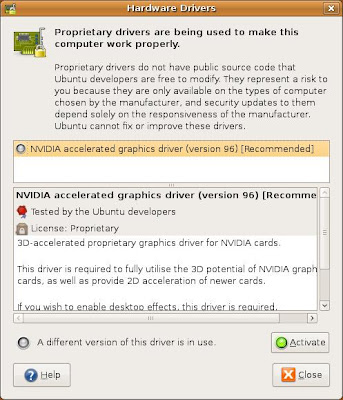
Here is how I recover to original setting:
- Re-boot the machine, and press 'ESC' to enter menu while GRUB loading.
- Enter Recovery Mode by selecting "Ubuntu 8.10, Kernel 2.6.27-7-generic (recovery mode)"
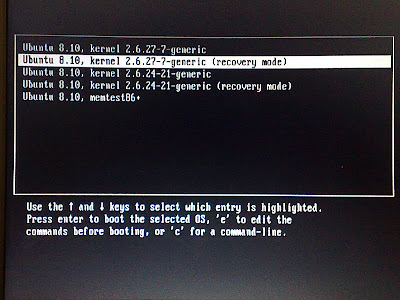
- Select "xfix Try to fix X sserver" in Recovery Menu.
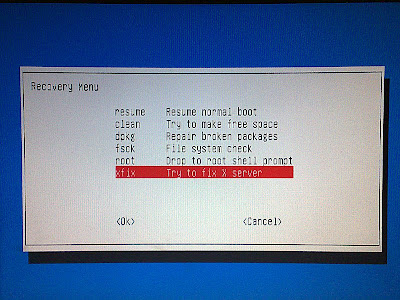
- After some process, the screen will return to Recovery Menu.
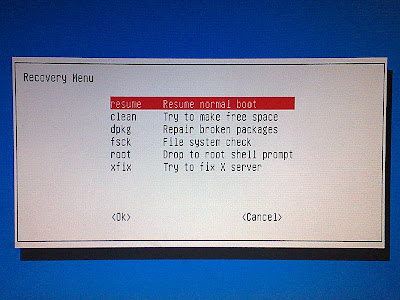
- Now, you can select "resume Resume normal boot". The normal display resumed:)

Here is how I recover to original setting:
- Re-boot the machine, and press 'ESC' to enter menu while GRUB loading.
- Enter Recovery Mode by selecting "Ubuntu 8.10, Kernel 2.6.27-7-generic (recovery mode)"

- Select "xfix Try to fix X sserver" in Recovery Menu.

- After some process, the screen will return to Recovery Menu.

- Now, you can select "resume Resume normal boot". The normal display resumed:)
Tuesday, November 04, 2008
Run Ubuntu Linux 8.04 LTS on 8G CF with CF to IDE Adapter

Compact-Flash(CF) card is a moveable electronic solid-state-disk(SSD) with IDE interface. It's a small card with mass space. With CF to IDE converter, it can be mount on IDE port and act as a SSD hard-disk. (Not apply to all machine, may be depends on BIOS support)

Un-mount the harddisk and replace it by the CF to IDE adapter with CF.

Please take a caution here: you have to place something under the card & the CF to IDE adapter, to prevent from short circuit by the metal case.

Resume all other parts and start to install Ubuntu as normal.
After install Ubuntu 8.04 LTS, a complete is Linux is run-up on a 8G CF.


Friday, October 31, 2008
Sun xVm fail after upgrade ubuntu from 8.04 LTS to 8.10

After upgrade ubuntu from 8.04 LTS to 8.10, Sun xVM fail to start VM, dur to "VERR_VM_DRIVER_NOT_INSTALLED (rc=-1908)".
Have to run the command "/etc/init.d/vboxdrv setup" as root to re-setup the kernel module.

Upgrade ubuntu from 8.04 LTS to 8.10

By default Ubuntu 8.04 LTS will not offer a upgrade to 8.10. This is because the 8.04 LTS version is a long term support release and 8.10 is a regular release. Upgrades from 8.04 LTS to 8.10 are fully supported, of course, and easy to enable.
Just a few step, ubuntu homepage have details how to do it>>
Thursday, October 30, 2008
Ubuntu® 8.10 Server Edition delivers significant new features to innovative user base
Ubuntu 8.10 Server Edition will be maintained for 18 months and adds significant enhancements in virtualisation, Java development and system management. This continues the project’s commitment to serve the needs of those users for whom innovation and performance are vital.
In tandem with the Ubuntu 8.04 Long Term Support (LTS) release, maintained for another four and a half years, Ubuntu offers users a real choice between the stability and longevity of the LTS releases and the opportunity to try the latest innovations of the Ubuntu 8.10 release. No other Linux or proprietary server OS supports this level of choice.
"Ubuntu 8.10 Server Edition is a terrific milestone that underlines the value in our twin track release strategy," said Jane Silber, COO of Canonical. "The server edition embraces cloud computing, virtualisation, mail server enhancements, Java development and deployment as well as a range of services to help system admininstrators and developers. Our six-monthly release cycle allows us to get these features in front of users faster continuing to make Ubuntu the best option for innovative organisations."
New to Ubuntu 8.10 Server Edition
Virtualisation
Building on the Just Enough Operating System (JeOS) version launched last year, Ubuntu 8.10 ships with a Virtual Machine builder. It allows complete Virtual Machines to be built from the command line in less than five minutes. Developers and system administrators can script the creation of custom virtual images. Vm-builder provides a key component to a dynamic provisioning process for businesses using virtualisation environments.
JeOS has been merged into the Server CD and is now available as an option at installation time. Ubuntu 8.10 officially supports running as a paravirtualized guest on Xen hypervisors. KVM has also been updated to allow more flexible memory management. Administrators can reduce or increase the memory allocated to any virtual machine without having to reboot it.
Complete Java Stack
Apache Tomcat 6.0 and OpenJDK are now fully supported options that make Ubuntu a great choice for developing and deploying Java applications in production environments.
Enhanced Mail Server Capabilities
ClamAV and SpamAssassin are now available from the main repository providing a supported solution for spam detection and virus filtering for mail infrastructures built on Ubuntu Server.
Improved RAID Support
Ubuntu 8.10 provides support for SATA "software" RAID controllers via DMRaid. Booting from a degraded RAID array is now configurable by the system administrator.
Encrypted Private Directory
Administrators can now easily set-up an Ubuntu system to provide encrypted private directories which are automatically mounted when users login locally or via ssh. Sensitive data is kept secure even if the system is stolen.
Hardening the Packages
The tool chain used to compile Ubuntu has been updated to include even more security features such as glibc function call fortification. Bugs in applications are even harder to be turned into exploitable vulnerabilities.
Uncomplicated Firewall is Getting Even Simpler
The Uncomplicated Firewall makes it easier to manage a host firewall thanks to the addition of application profiles. Common services such as apache, bind9, cups, dovecot, openssh, postfix or samba declare which ports they use so that the administrator only enables a network service rather than a set of ports.
Landscape Client Bundled within Ubuntu
Landscape client provides a free reporting function at each login. Key information such as system statistics is added to the "message of the day" that is displayed at login (motd). Any type of metric can be gathered simply by writing plugins for Landscape client.
Landscape is Canonical's lightweight system management tool for Ubuntu systems that allows automated deployment and monitoring. Full activation of the client for landscape customers is now available within the installer.
Ubuntu® 8.10 Desktop Edition enables mobile, flexible computing for a changing digital world
Ubuntu 8.10 Desktop Edition is designed for the pervasively connected digital lifestyle. With new 3G network support, users can move smoothly from wired and WiFi networks onto 3G cellphone networks while traveling. Ubuntu 8.10 is also built to be shared - users can start a quick "guest session" on the fly and let someone use their computer to surf the web or check email, while maintaining the security and integrity of their own data. And if that person really enjoys their brief session as an Ubuntu guest, they can put Ubuntu on any USB key and take it home to install on their own computer rather than having to burn a CD.
As a bonus, all Ubuntu 8.10 users will be able to enjoy programming from the BBC, with high quality streamed content available through the default media players in Ubuntu 8.10. Canonical has worked with the BBC to make sure that much of the material is available to users in all locations.
"Ubuntu 8.10 sees us lay the groundwork for a radically different, more mobile, desktop computing environment over the next two years," says Jane Silber, COO of Canonical and head of Online Services for Canonical. "Our rapid release cycle means we can deliver the elements to support this future faster, more fully realised, and more attractively packaged than the traditional OS vendors. Ubuntu 8.10 has many features that sign-post how Linux will provide the drive and innovation in desktop computing."
"Working with open source technologies like GNOME, Ubuntu 8.10 provides exciting new features for users like creating an always-on system that seamlessly connects wireless and cellular networks," said Stormy Peters, executive director at the GNOME Foundation. "Users no longer need to worry about finding a network - their computer is always connected. This is a great step for both mobile and desktop computing."
Features
3G Support
For constant connectivity public WiFi has limitations. Improvements to the network manager in Ubuntu 8.10 makes it simple to detect and connect to 3G networks and manage connectivity. This connectivity is delivered through an inbuilt 3G modem, through 'dongle' support, through a mobile phone or through Bluetooth. It is a complex environment that Ubuntu 8.10 simplifies through a single interface and the auto-detection of many of the most popular devices.
Write Ubuntu to and Install from a USB Drive
Ubuntu has been made available to users as an image for CDs and DVDs to date. But CDs and DVDs are slower, less portable and less convenient than USB sticks. Now, a simple application in Ubuntu will allow users to write Ubuntu to a USB drive, even a modified version of Ubuntu with their data on it, so it can be carried everywhere to plug in and use on any machine.
Guest Sessions
In a world of 'always on' pervasive computing it is more likely that users lend their computers to colleagues or friends at conferences, cafes or at parties so they can check email, etc. Guest sessions allow users to lock down a session easily so a guest can use the full system without interference with programs or data.
BBC Content
Starting the media players within Ubuntu (Totem Movie Player and Rhythmbox) launches a menu of selected content from the broadcaster that is free to air. This is a mixture of video, radio and podcasts and available in high quality, much of it playable using non-proprietary codecs. Content is constantly updated via the corporation's stream and will vary dependent on location, though some content will be available for every user.
Latest Gnome 2.24 Desktop Environment*
The GNOME desktop environment project releases its latest version which is incorporated into Ubuntu 8.10. New features include a new instant messaging client, a built-in time tracker, , improved file management and toolbars plus better support for multiple monitor use with the ability to set screen resolution by monitor.
Wednesday, October 29, 2008
How to know the installed Java and where is the installed path?
To know the installed version you can type the command javac/java with the option -version:
$ javac -version
$ java -version
To check where is the installed path, use the which command:
$ which javac
$ which java

$ javac -version
$ java -version
To check where is the installed path, use the which command:
$ which javac
$ which java

Sunday, October 26, 2008
Install NetBeans IDE 6.1 on Ubuntu 8.04

I tried to download and install NetBeans IDE 6.1 on my machine with Ubuntu 8.04 installed, but the installer always complain about no Java Interpreter found.
Finally, I install NetBeans IDE 6.0.1 from Ubuntu "Add/Remove Applications" first, then download and install Java SE Development Kit 6u10 with NetBeans IDE 6.1 Bundle, which can be downloaded here. I have two NetBeans now.

Sun xVM VirtualBox, Just released
Turn your PC into an easy-to-use virtualization platform with Sun xVM VirtualBox, the free and open source software that runs on all major operating systems and eliminates the need for tradeoffs or multiple hardware systems.
Sun xVM VirtualBox, Just released. download here
Sun xVM VirtualBox, Just released. download here
Sunday, October 19, 2008
Sun xVM VirtualBox
Free and Open Source
xVM VirtualBox desktop virtualization available for all major operation systems.
Turn your PC into an easy-to-use virtualization platform with Sun xVM VirtualBox, the free and open source software that runs on all major operating systems and eliminates the need for tradeoffs or multiple hardware systems.

Sun xVM VirtualBox run WindowsXP, on Ubuntu Linux.
xVM VirtualBox desktop virtualization available for all major operation systems.
Turn your PC into an easy-to-use virtualization platform with Sun xVM VirtualBox, the free and open source software that runs on all major operating systems and eliminates the need for tradeoffs or multiple hardware systems.

Wednesday, October 01, 2008
How to install Sun Java Development Kit (JDK) & Java Runtime Environment (JRE) on Ubuntu Linux
- Run the following command in Terminal:
$ sudo apt-get install sun-java6-bin sun-java6-jre sun-java6-jdk
- Set the Sun Java as the default Java:
$ sudo update-java-alternatives -s java-6-sun
- Make the Sun JVM as the first searchable JVM
used and text editor to edit the file /etc/jvm. Make sure /usr/lib/jvm/java-6-sun is the first in the jvm list.
# This file defines the default system JVM search order. Each
# JVM should list their JAVA_HOME compatible directory in this file.
# The default system JVM is the first one available from top to
# bottom.
/usr/lib/jvm/java-6-sun
/usr/lib/jvm/java-gcj
/usr/lib/jvm/ia32-java-1.5.0-sun
/usr/lib/jvm/java-1.5.0-sun
/usr
- Set JAVA_HOME and PATH
used and text editor to edit the file $HOME/.bash_profile
Append the line:
export JAVA_HOME=/usr/lib/jvm/java-6-sun
export PATH=$PATH:$JAVA_HOME/bin
- Now you can clarify you java version:
$ java -version
java version "1.6.0_06"
Java(TM) SE Runtime Environment (build 1.6.0_06-b02)
Java HotSpot(TM) Client VM (build 10.0-b22, mixed mode, sharing)
- That's.
$ sudo apt-get install sun-java6-bin sun-java6-jre sun-java6-jdk
- Set the Sun Java as the default Java:
$ sudo update-java-alternatives -s java-6-sun
- Make the Sun JVM as the first searchable JVM
used and text editor to edit the file /etc/jvm. Make sure /usr/lib/jvm/java-6-sun is the first in the jvm list.
# This file defines the default system JVM search order. Each
# JVM should list their JAVA_HOME compatible directory in this file.
# The default system JVM is the first one available from top to
# bottom.
/usr/lib/jvm/java-6-sun
/usr/lib/jvm/java-gcj
/usr/lib/jvm/ia32-java-1.5.0-sun
/usr/lib/jvm/java-1.5.0-sun
/usr
- Set JAVA_HOME and PATH
used and text editor to edit the file $HOME/.bash_profile
Append the line:
export JAVA_HOME=/usr/lib/jvm/java-6-sun
export PATH=$PATH:$JAVA_HOME/bin
- Now you can clarify you java version:
$ java -version
java version "1.6.0_06"
Java(TM) SE Runtime Environment (build 1.6.0_06-b02)
Java HotSpot(TM) Client VM (build 10.0-b22, mixed mode, sharing)
- That's.
Tuesday, May 20, 2008


Thursday, May 15, 2008
Kruler

Kruler is a small and useful tool for KDE, I found it on Fedora 9. It's a screen ruler (using pixels) and color measurement tool.
Subscribe to:
Posts (Atom)


