Normally, user cannot login as root in the login screen, because there are no password for root user in default. In order to login as root, a password for root user have to be set manually.
To set password for root user?
Start a Terminal and type the command:
sudo passwd
You will be as to type in the new root password twice. After that, re-login as root with the new password in login screen.
Tuesday, May 04, 2010
Saturday, May 01, 2010
Ubuntu 10.04 LTS
What is Ubuntu?
Ubuntu is an operating system built by a worldwide team of expert developers. It contains all the applications you need: a web browser, office suite, media apps, instant messaging and much more.
Ubuntu is an open-source alternative to Windows and Office.
The Ubuntu promise
* Ubuntu will always be free of charge, along with its regular enterprise releases and security updates
* Ubuntu comes with full commercial support from Canonical and hundreds of companies from across the world
* Ubuntu provides the best translations and accessibility features that the free software community has to offer
* Ubuntu core applications are all free and open source. We want you to use free and open source software, improve it and pass it on.
Saturday, January 02, 2010
How to mount ISO in ubuntu
Gmount-iso (gmountiso) is a small tool written using PyGTK and Glade. It allows you to easily mount your cd images. This is a frontend to the 'mount -o loop -t iso9660 foo.iso /mountpoint' command
Install gmountiso:
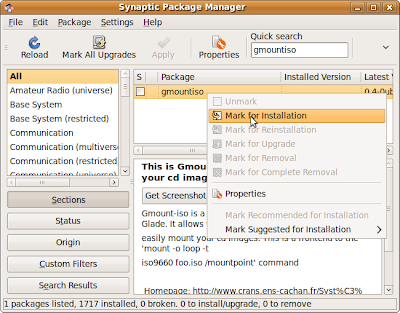
Start Synaptic Package Manager from Administration on top menu of ubuntu, type gmountiso in the Quich Search box. Right click on gmountiso and mark it to install. And then click Apply.
Create a mount point:
In order to mount a ISO, you have to creat a mount point somewhere, just create a folder on your desktop is OK.
Start gmountiso from ubuntu top menu:
Applications > System Tools > Gmount-iso
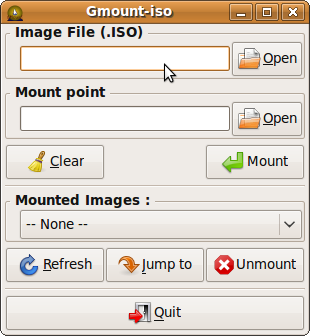
Just click Open to select Image File (.iso), and Mount Point, and then click the button mount.
Install gmountiso:
Start Synaptic Package Manager from Administration on top menu of ubuntu, type gmountiso in the Quich Search box. Right click on gmountiso and mark it to install. And then click Apply.

Create a mount point:
In order to mount a ISO, you have to creat a mount point somewhere, just create a folder on your desktop is OK.
Start gmountiso from ubuntu top menu:
Applications > System Tools > Gmount-iso

Just click Open to select Image File (.iso), and Mount Point, and then click the button mount.

Sunday, December 20, 2009
How to share files/folders between two computers running ubuntu? OpenSSH!
To share files/folder between two computers running ubuntu, OpenSSH is a easy way to do it.
To install OpenSSH client and server on both computer:
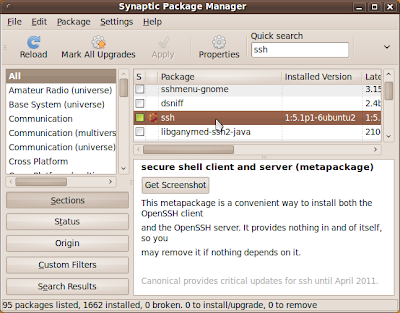
Start Synaptic Package Manager from Administration from top menu of ubuntu, type ssh in the Quich Search box, scroll down to find the package ssh. Right click on ssh and mark it to install. You will be prompted to mark the other required packages also. Go ahead to install it.
You have to check the ip address of the computer in the server side.
Right click the NetworkManager Applet on the menu bar on top of ubuntu, select Connection Information.
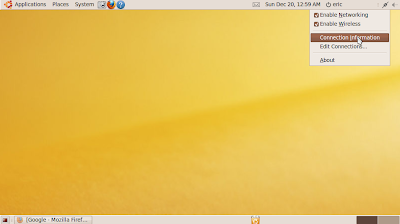
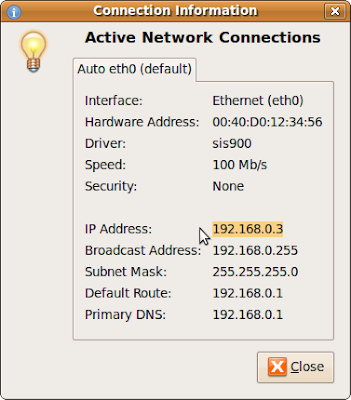
Mark down the ip address, it's 192.168.0.3 in my case.
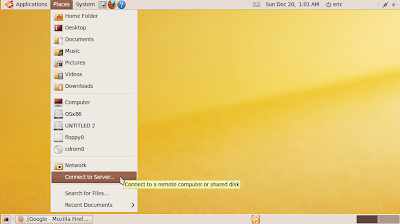
In the client side, click on Place on top menu of ubuntu, select Connect to Server...
Enter the information:
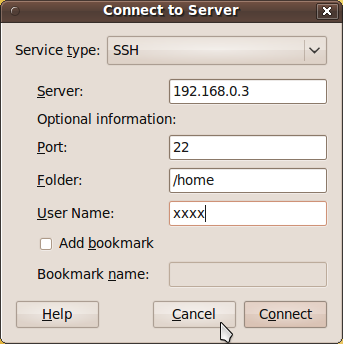
Service type: SSH
Server: the ip address of your server.
Port: 22
Folder: the folder you want to log-in.
User Name: name of the user in the server.
Click Connect
You will be prompted to enter the password of the user in the server. Enter and click Connect.
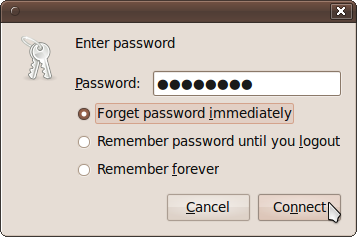
After a moment, you can access the server computer using OpenSSH.
To install OpenSSH client and server on both computer:
Start Synaptic Package Manager from Administration from top menu of ubuntu, type ssh in the Quich Search box, scroll down to find the package ssh. Right click on ssh and mark it to install. You will be prompted to mark the other required packages also. Go ahead to install it.

You have to check the ip address of the computer in the server side.
Right click the NetworkManager Applet on the menu bar on top of ubuntu, select Connection Information.

Mark down the ip address, it's 192.168.0.3 in my case.

In the client side, click on Place on top menu of ubuntu, select Connect to Server...

Enter the information:

Service type: SSH
Server: the ip address of your server.
Port: 22
Folder: the folder you want to log-in.
User Name: name of the user in the server.
Click Connect
You will be prompted to enter the password of the user in the server. Enter and click Connect.

After a moment, you can access the server computer using OpenSSH.
Thursday, November 12, 2009
Moblin 2.1 Netbooks and Nettops Project Release
This is latest official project release of Moblin for Netbook and Nettops. Additional releases are available to keep you updated on the latest Moblin development. Released November 04, 2009.
moblin.org
moblin.org
Moblin v2.1 Feature Summary
In addition to the various new features, this new version of Moblin includes several hundred bug fixes and incorporates feedback from users and the developer community. Much polish and performance improvement was accomplished within this release from the Moblin developers. New features in Moblin v2.1 for netbooks and nettops include:
- Internet Browser. After much work, we are including a new internet browser application that far exceeds our previous browser performance and adds full support for features such as plug-in support and add-ons. Many thanks to Moblin users and the developer community for their feedback and contributions.
- 3G Data Support. Support for 3G data connections using the Ericsson* MBM 3G modems. Support for additional 3G modems is planned for future releases.
- Application Installer Integration. The Moblin Application Installer is integrated and provides a logically categorized list of applications that you can choose to install. The selection of applications that appears within the Moblin Application Installer comes from the Moblin Garage.
- Clutter 1.0. With this new version of Moblin, we are releasing Clutter 1.0, the Moblin animation framework.
- Bluetooth* Device Support. Bluetooth* device discovery and pairing now supported via a new panel in the toolbar, which supports Bluetooth* audio devices, input devices (keyboards, mice), OBEX file transfer, and using a Bluetooth* phone as a 3G modem.
- Connection Manager. Connection Manager (ConnMan) has significant modifications particularly in the areas of performance and reliability. The new version of ConnMan now supports Ethernet, WiFi, WiMAX, and 3G.
- Nettop Support. UI scaling is provided for a wide range of nettop resolutions, including the ability to show more information in the Myzone panel based on the available screen space.
- Improvements to Instant Messaging. Improvements have been included for Instant Messaging account setup, integration within the connection manager, and support for transparent connection to your friends on your local network.
- Input Method Support. Input method support is now included across the system.
- Localization. Moblin is currently localized in the following languages (English, Brazilian Portuguese, Spanish, French, German, Swedish, Finnish, Korean, Japanese, Chinese Simplified, Chinese Traditional). We also have a community translation project where Moblin is translated to additional languages by the community.
- In addition, Moblin v2.1 includes several updated versions of key technology components that the Moblin developers worked on with the various communities; these include the Linux kernel version 2.6.31, Intel Linux graphics driver 2.9, X server 1.6.4, and Mesa 7.6. We are also providing updated documentation, sample code and updates to the Moblin SDK. Detailed Moblin UX help documentation is included in multiple languages along with updated Moblin SDK documentation and sample code.
Saturday, October 31, 2009
Ubuntu 3D Desktop Howto
Small tutorial to enabled 3D effects and add a application dock bar in Ubuntu Karmic 9.10.
This video was created in Ubuntu 9.10 Alpha, using a ATI RS480 built-in gfx chipset on old Shuttle ST20G5. It's kind of slow because the recording software brings the framerate to it's knees on this box. Otherwise works fast enough when I'm not recording the desktop at same time.
ATI opensource drivers are much better in this release, but I still have severe crashes once, or twice a day while using the machine.
Basic 3D works ok, but there is still plenty to fix:
- Google Earth still has problems with ATI opensource drivers.
- Xrandr 1.3 can't enable my DVI monitor, if I boot the machine with a VGA monitor pluged in. But if I power of the machine disconnect the VGA cable, start with the DVI monitor and then plug the VGA cable and enable second monitor, it works.
- Dual monitor: If I enable both monitor with 1920x1080 resolutions 3D stops working or refresh becomes very slow, If I reduce the resolution all becomes usable around 1280x1024 on both monitor.
Thursday, October 29, 2009
Ubuntu 9.10 is available
The new Ubuntu 9.10 is available to download here.
What is Ubuntu?
Ubuntu is an operating system built by a worldwide team of expert developers. It contains all the applications you need: a web browser, office suite, media apps, instant messaging and much more.
Ubuntu is an open-source alternative to Windows and Office.
What is Ubuntu?
Ubuntu is an operating system built by a worldwide team of expert developers. It contains all the applications you need: a web browser, office suite, media apps, instant messaging and much more.
Ubuntu is an open-source alternative to Windows and Office.
Tuesday, October 20, 2009
New moblin 2.1 preview Image posted
 A new preview of the Moblin v2.1 image is now available for download and testing. Many new features and bug fixes are available in this image.
Source: New moblin 2.1 preview Image posted | moblin.org
Saturday, October 10, 2009
Ubuntu 9.10 Coming Soon!
Ubuntu 9.10 is coming soon, it will be be released on October 29th, 2009. Or, you can download the Beta now.
Ubuntu web site.
Ubuntu web site.
Wednesday, September 23, 2009
Nokia N900 - Maemo Video Overview
Maemo is a computer architecture platform built using open source Linux components. Maemo is one of Nokia’s core handset platforms characterized by high performance, new cool UI principles and Internet philosophy.
To know more about The Maemo platform.
Thursday, September 10, 2009
Linux From Scratch
Linux From Scratch (LFS) is a project that provides you with step-by-step instructions for building your own custom Linux system, entirely from source code.
It's a very good for whom want to understand Linux in more.
LFS also provide a LFS LiveCD
A LFS LiveCD is a CD that is able to boot your system into a 'live', working operating system, independent of anything on your hard drive. It's a little different than an installation CD, which boots your system into a program that will guide you through the installation of some system onto your hard drive. With a LiveCD, you have an entire system contained on the CD and with that, the freedom to do nearly anything that a system installed on your hard drive can.
The LFS LiveCD is geared specifically toward providing a reliable host system for the purpose of building Linux From Scratch. Therefore, it may not be what you would envision as a "perfect" Linux system. It should, however, provide you with a comfortable enough environment so that you can, in turn, build your own "perfect" system.
Tuesday, August 11, 2009
Installing Firefox 3.5 on Ubuntu

Firefox 3.5 is available.
The Check For Updates link in Firefox is disabled in Ubuntu. Firefox should only be updated through the package-management system.
or install it directly:
install the following package: firefox-3.5. Firefox 3.5 will be installed alongside Firefox 3.0.
When you have installed the new package, a new icon will appear in Applications > Internet alongside your old Firefox icon. The name is based on the codename for the new Firefox release, so Firefox 3.5 was labelled Shiretoko Web Browser.
more details: https://help.ubuntu.com/community/FirefoxNewVersion

Friday, July 31, 2009
How to install KDE on ubuntu
The default desktop of Ubuntu is Gnome.If you want KDE, you can install Kubuntu.
Alternatively, you can install Kubuntu on Ubuntu using Synaptic Package Manager.
Click System > Administration > Synaptic Package Manager on Ubuntu menu.
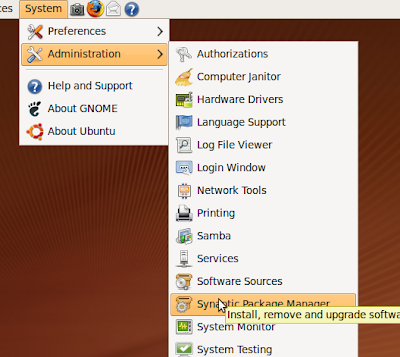
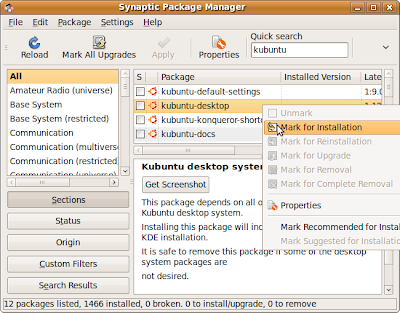
Type Kubuntu inside the Quick search box, mark Kubuntu to install.
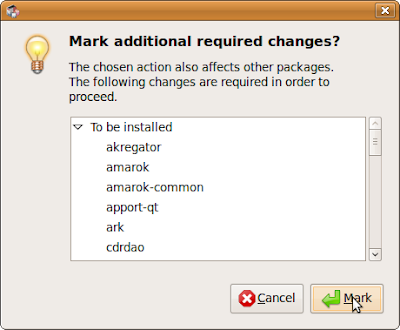
You will be asked to mark additional required changes, just mark it.
And click Apply.
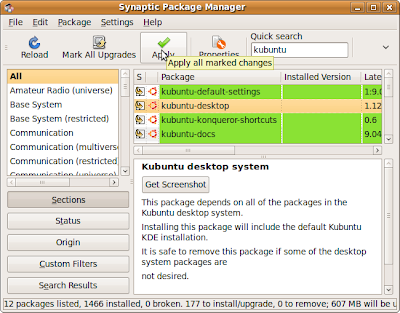
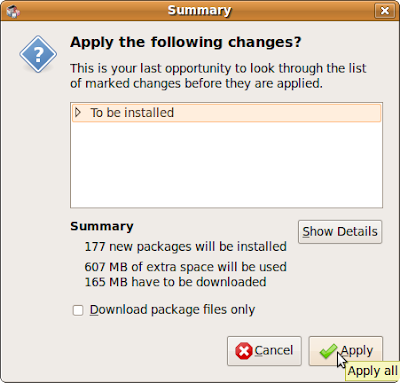
Click Apply again to confirm changes.
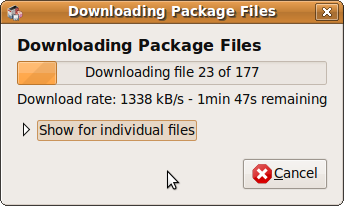
Wait the package to be downloaded.
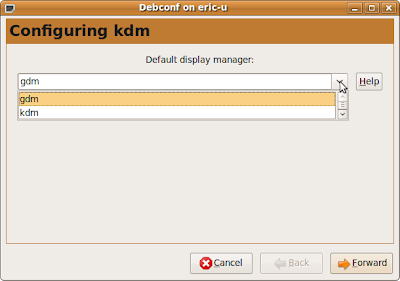
You will be asked to select the default display manager, gdm? or kdm? It's the display manager of the login screen , any one is ok.
Wait install and changes applied.
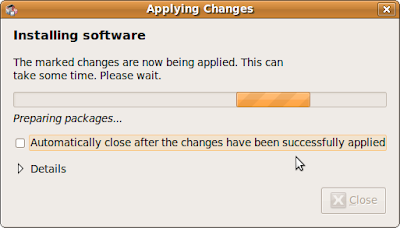
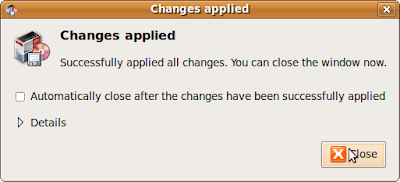
Now, you can restart or log-out and log-in again to switch to KDE.
You can Select KDE Session by clicking Options on the lower-left of login screen.
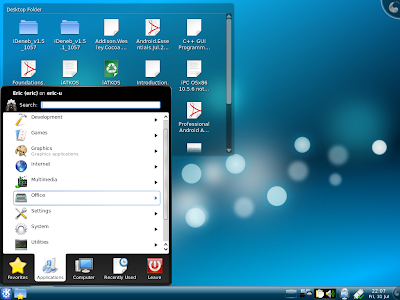
Now, your system have both Gnome and KDE installed, you can switch between in login screen.
Alternatively, you can install Kubuntu on Ubuntu using Synaptic Package Manager.
Click System > Administration > Synaptic Package Manager on Ubuntu menu.

Type Kubuntu inside the Quick search box, mark Kubuntu to install.

You will be asked to mark additional required changes, just mark it.

And click Apply.

Click Apply again to confirm changes.

Wait the package to be downloaded.

You will be asked to select the default display manager, gdm? or kdm? It's the display manager of the login screen , any one is ok.

Wait install and changes applied.


Now, you can restart or log-out and log-in again to switch to KDE.
You can Select KDE Session by clicking Options on the lower-left of login screen.

Now, your system have both Gnome and KDE installed, you can switch between in login screen.
Thursday, July 23, 2009
How to setup cvs server on Ubuntu
Install cvs and cvsd, start Synaptic Package Manager from ubuntu menu bar
System > Administration > Synaptic Package Manager
typ cvs in Quick Search box, select cvs and cvsd, click Apply.
When installing cvsd, you will be asked to enter Repositories to serve, the default setting is /demo:/myrepos, just accept it and click Forward.
After changes applied, you can close Synaptic Package Manager.
Next, open a Terminal.
Type the command to create /myrepos
#cd /var/lib/cvsd
#sudo mkdir myrepos
Initial /myrepos
#sudo cvs -d /var/lib/cvsd/myrepos init
Modify the file /var/lib/cvsd/myrepos/CVSROOT/config
(May be you have to change the permission to writable)
#sudo gedit /var/lib/cvsd/myrepos/CVSROOT/config
Add the line into it:
SystemAuth=no
PamAuth=no
LockDir=/tmp/myrepos
Save and Exit editor
Create LockDir
#sudo mkdir /var/lib/cvsd/tmp/myrepos
Add a user, named cvsuser
#sudo cvsd-passwd /var/lib/cvsd/myrepos cvsuser
You will be ask to input password.
Modify /etc/cvsd/cvsd.conf
#sudo gedit /etc/cvsd/cvsd.conf
Scroll to end of the file, find the text
Listen * 2401
Repos /demo
Repos /myrepos
change to
Listen 127.0.0.1 2401
Repos /demo
Repos /myrepos
where 127.0.0.1 is my local static IP, 2401 is the default port used by cvs.
and then, set the right.
#sudo chown cvsd:cvsd /var/lib/cvsd -R
Restart cvsd
#sudo /etc/init.d/cvsd restart
You can check the cvsd status using the command, and make sure it's running.
#sudo /etc/init.d/cvsd status
Wednesday, November 26, 2008
aMSN messenger - MSN on Linux

aMSN, a very nice MSN compatible messenger application, aMSN Messenger is a multiplatform MSN messenger clone. Works pretty much like its Windows based counterpart. Perfect for keeping in touch with those friends who have not yet seen the light. Works on linux
sMSN Homepage
Tuesday, November 11, 2008
Display disappear after install new graphics driver!!!
Today, I was prompted by ubuntu 8.10 to install NVIDIA accelerated graphics driver. I accept by pressing Activate to download and install the updated graphics driver and restart. But the display disappear after re-boot. May be my machine is too old and not supported by the new driver!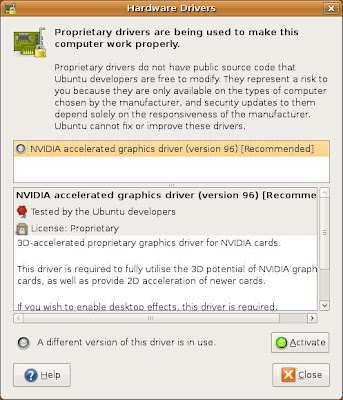
Here is how I recover to original setting:
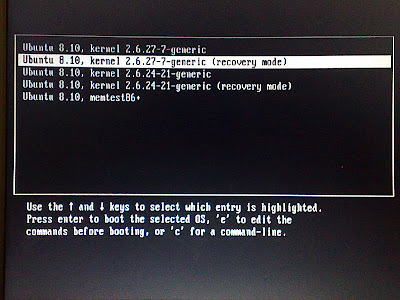
- Re-boot the machine, and press 'ESC' to enter menu while GRUB loading.
- Enter Recovery Mode by selecting "Ubuntu 8.10, Kernel 2.6.27-7-generic (recovery mode)"
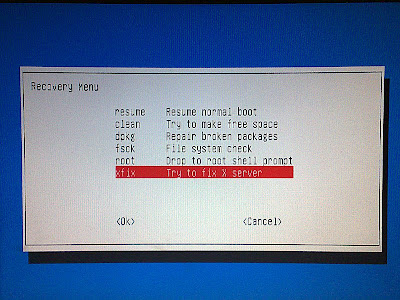
- Select "xfix Try to fix X sserver" in Recovery Menu.
- After some process, the screen will return to Recovery Menu.
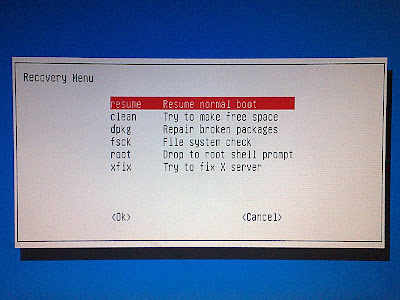
- Now, you can select "resume Resume normal boot". The normal display resumed:)

Here is how I recover to original setting:
- Re-boot the machine, and press 'ESC' to enter menu while GRUB loading.
- Enter Recovery Mode by selecting "Ubuntu 8.10, Kernel 2.6.27-7-generic (recovery mode)"

- Select "xfix Try to fix X sserver" in Recovery Menu.

- After some process, the screen will return to Recovery Menu.

- Now, you can select "resume Resume normal boot". The normal display resumed:)
Tuesday, November 04, 2008
Run Ubuntu Linux 8.04 LTS on 8G CF with CF to IDE Adapter

Compact-Flash(CF) card is a moveable electronic solid-state-disk(SSD) with IDE interface. It's a small card with mass space. With CF to IDE converter, it can be mount on IDE port and act as a SSD hard-disk. (Not apply to all machine, may be depends on BIOS support)

Un-mount the harddisk and replace it by the CF to IDE adapter with CF.

Please take a caution here: you have to place something under the card & the CF to IDE adapter, to prevent from short circuit by the metal case.

Resume all other parts and start to install Ubuntu as normal.
After install Ubuntu 8.04 LTS, a complete is Linux is run-up on a 8G CF.


Friday, October 31, 2008
Sun xVm fail after upgrade ubuntu from 8.04 LTS to 8.10

After upgrade ubuntu from 8.04 LTS to 8.10, Sun xVM fail to start VM, dur to "VERR_VM_DRIVER_NOT_INSTALLED (rc=-1908)".
Have to run the command "/etc/init.d/vboxdrv setup" as root to re-setup the kernel module.

Upgrade ubuntu from 8.04 LTS to 8.10

By default Ubuntu 8.04 LTS will not offer a upgrade to 8.10. This is because the 8.04 LTS version is a long term support release and 8.10 is a regular release. Upgrades from 8.04 LTS to 8.10 are fully supported, of course, and easy to enable.
Just a few step, ubuntu homepage have details how to do it>>
Thursday, October 30, 2008
Ubuntu® 8.10 Server Edition delivers significant new features to innovative user base
Ubuntu 8.10 Server Edition will be maintained for 18 months and adds significant enhancements in virtualisation, Java development and system management. This continues the project’s commitment to serve the needs of those users for whom innovation and performance are vital.
In tandem with the Ubuntu 8.04 Long Term Support (LTS) release, maintained for another four and a half years, Ubuntu offers users a real choice between the stability and longevity of the LTS releases and the opportunity to try the latest innovations of the Ubuntu 8.10 release. No other Linux or proprietary server OS supports this level of choice.
"Ubuntu 8.10 Server Edition is a terrific milestone that underlines the value in our twin track release strategy," said Jane Silber, COO of Canonical. "The server edition embraces cloud computing, virtualisation, mail server enhancements, Java development and deployment as well as a range of services to help system admininstrators and developers. Our six-monthly release cycle allows us to get these features in front of users faster continuing to make Ubuntu the best option for innovative organisations."
New to Ubuntu 8.10 Server Edition
Virtualisation
Building on the Just Enough Operating System (JeOS) version launched last year, Ubuntu 8.10 ships with a Virtual Machine builder. It allows complete Virtual Machines to be built from the command line in less than five minutes. Developers and system administrators can script the creation of custom virtual images. Vm-builder provides a key component to a dynamic provisioning process for businesses using virtualisation environments.
JeOS has been merged into the Server CD and is now available as an option at installation time. Ubuntu 8.10 officially supports running as a paravirtualized guest on Xen hypervisors. KVM has also been updated to allow more flexible memory management. Administrators can reduce or increase the memory allocated to any virtual machine without having to reboot it.
Complete Java Stack
Apache Tomcat 6.0 and OpenJDK are now fully supported options that make Ubuntu a great choice for developing and deploying Java applications in production environments.
Enhanced Mail Server Capabilities
ClamAV and SpamAssassin are now available from the main repository providing a supported solution for spam detection and virus filtering for mail infrastructures built on Ubuntu Server.
Improved RAID Support
Ubuntu 8.10 provides support for SATA "software" RAID controllers via DMRaid. Booting from a degraded RAID array is now configurable by the system administrator.
Encrypted Private Directory
Administrators can now easily set-up an Ubuntu system to provide encrypted private directories which are automatically mounted when users login locally or via ssh. Sensitive data is kept secure even if the system is stolen.
Hardening the Packages
The tool chain used to compile Ubuntu has been updated to include even more security features such as glibc function call fortification. Bugs in applications are even harder to be turned into exploitable vulnerabilities.
Uncomplicated Firewall is Getting Even Simpler
The Uncomplicated Firewall makes it easier to manage a host firewall thanks to the addition of application profiles. Common services such as apache, bind9, cups, dovecot, openssh, postfix or samba declare which ports they use so that the administrator only enables a network service rather than a set of ports.
Landscape Client Bundled within Ubuntu
Landscape client provides a free reporting function at each login. Key information such as system statistics is added to the "message of the day" that is displayed at login (motd). Any type of metric can be gathered simply by writing plugins for Landscape client.
Landscape is Canonical's lightweight system management tool for Ubuntu systems that allows automated deployment and monitoring. Full activation of the client for landscape customers is now available within the installer.
Subscribe to:
Posts (Atom)


